A10 Control Licensing
Deploying A10 Control and managing Thunder devices requires valid licenses. Licenses ensure access to features, functionalities, and entitlements across the platform and registered devices.
There are two broad classes of licenses:
- A10 Control platform licenses – used to operate the controller itself (management and application entitlements).
- Thunder device licenses – used to configure and manage Thunder devices (FlexPool capacity/instance) and Host OS (RHEL).
Supported License Managers
The following license managers are supported in the A10 Control:
| License Manager | Description | Supported License Types |
|---|---|---|
|
Global License Manager (GLM) |
Default license manager. Licenses are activated directly with the GLM portal over the internet. Use when: The deployment has internet connectivity and centralized license management is preferred without local license servers. Use Case: A service provider with data centers in multiple regions connects each A10 Control instance to GLM online. All Thunder device licenses are managed centrally through GLM, reducing the need for on-premises license infrastructure. |
|
|
A10 Control License Manager (ALM) |
Designed for air-gapped or offline environments. ALM is activated through GLM by exporting/importing a license file. Use when: Compliance or security requirements prevent direct internet access. Provides local license management inside isolated networks. Use Case: A government agency operates in a secure environment with no internet connectivity. They activate ALM through GLM once, then manage Thunder device licenses entirely offline inside their air-gapped network. |
|
|
Remote A10 Control as Primary License Manager |
Used in multi-site or large-scale deployments with multiple A10 Control instances. One instance (with ALM enabled) acts as the primary license authority, and other instances point to it. Use When: A single entitlement needs to be shared across multiple sites while device management remains local. Use Case: For more information, see Example for Remote A10 Control as Primary License Manager. |
|
Example for Remote A10 Control as Primary License Manager
A customer operates three sites, Site-1, Site-2, and Site-3. Each site is running a dedicated A10 Control instance (Instance-1, Instance-2, and Instance-3) that manages its local Thunder devices.
To use single entitlement token for all sites while keeping device operations restricted to each site, leverage Remote A10 Control as Primary License Manager by following these steps:
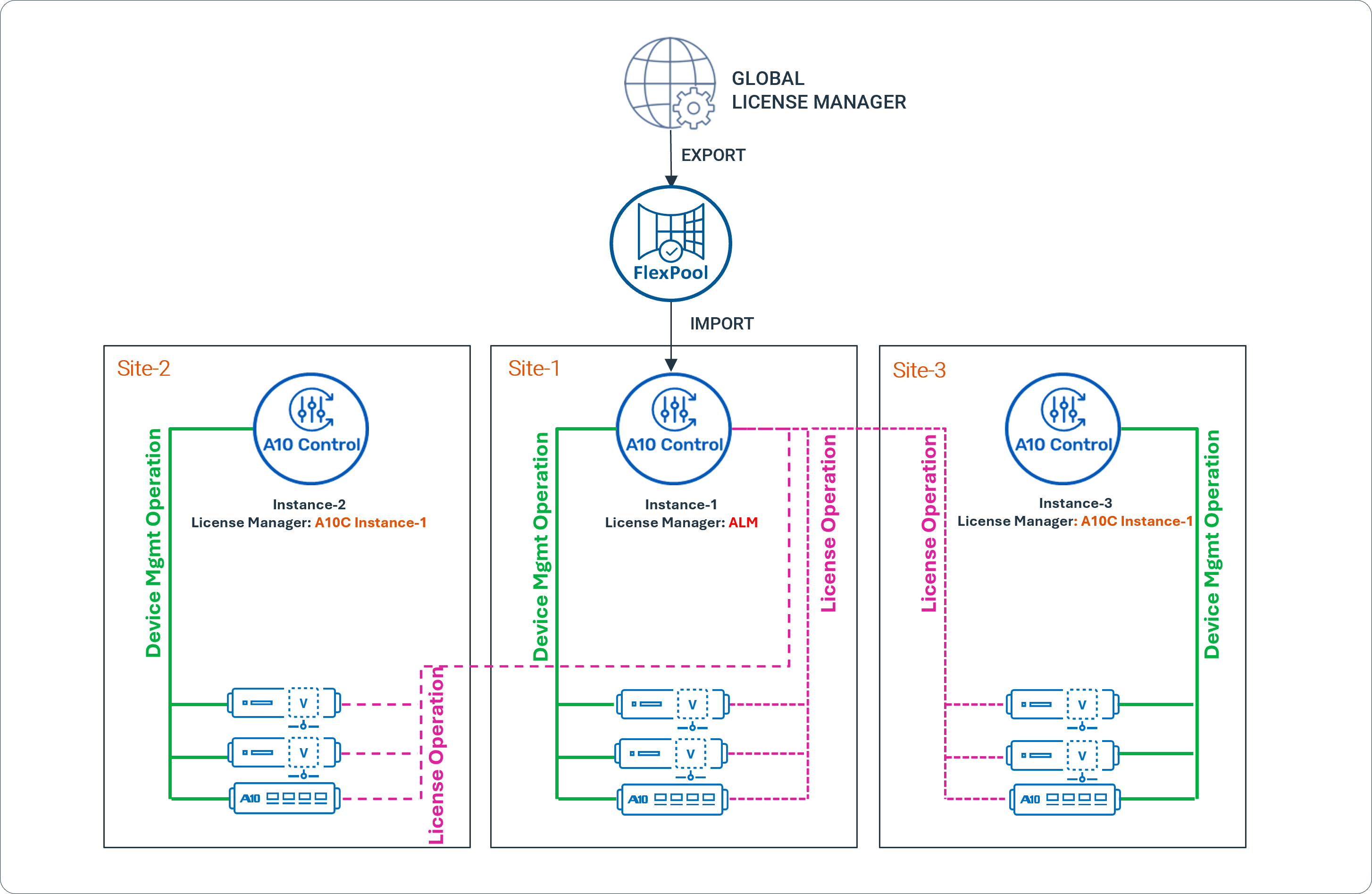
- Configure Instance-1 (at Site-1) as the A10 Control License Manager (ALM).
- Activate ALM through GLM:
- Export the FlexPool device license from GLM.
- Import this license file into ALM on Instance-1.
- On Instance-2 and Instance-3, select Remote A10 Control as Primary License Manager and enter the IP address of Instance-1 (ALM).
- Once configured:
- Instance-1 (ALM) operates as a local GLM for the entire deployment.
- When a Thunder device in Site-2 or Site-3 requests a license, the request is forwarded to Instance-1 (shown as the pink line in Figure).
- Device management operations remain local (shown as the green lines in Figure). For example, Instance-1 cannot view or control devices managed by Instance-2 or Instance-3; it only manages their license information.
Supported License Types
The following license types can be imported into A10 Control from the Global License Manager (GLM):
| License Type | Description |
|---|---|
|
A10 Control Standard |
Base management license. Includes entitlements for ADC, CGNAT, GiFW, and SSLi Apps. |
|
A10 Control ADO |
Management license for ADO application. |
|
Capacity FlexPool |
Flexible capacity-based license for Thunder devices. |
|
Instance FlexPool |
Flexible instance-based license for Thunder devices. |
|
RHEL Support |
Host OS entitlement required for ACOS 7.x and for upgrades from ACOS 6.x to ACOS 7.x. |
License Distribution Email
When an organization purchases A10 Control or related device licenses, a License Token email is automatically sent to the designated administrator at the time of order fulfillment.
This email includes:
| Parameter | Description |
|---|---|
|
Software Download Link |
URL provided in the email to download the required software. GLM credentials are needed to access the download portal. |
|
License Entitlement Token |
Unique token provided in the email. It is required to generate the license file for activation. |
|
UUID (License UID) |
Value retrieved by running the |
|
Appliance Activation Link |
Direct link provided in the email to the GLM portal for appliance activation (https://glm.a10networks.com). |
|
License Start / Expiry |
Dates provided in the email that define the license validity period (start and expiration dates). |
License Management Scopes
The following scopes are available in A10 Control for managing licenses:
| Scope | Description | Key Features and Users |
|---|---|---|
|
Controller-Scope |
Centralized license management for the entire A10 Control platform and all registered Thunder devices. |
Platform administrators or super-admins can configure and manage the license managers, import/revoke/un-revoke licenses, view device activations, and monitor license usage across all devices. For more information, see License Management . |
|
Organization-Admin Scope |
Manages licenses within a specific organization. |
Organization admins can view licenses assigned to their organization, allocate FlexPool licenses (Capacity and Instance) across devices, update license capacities, view activity logs, and delete or reassign licenses without affecting other organizations. For more information, see Licenses. |
License Expiry Notifications
Users are notified of license expiry as follows:
| Notification Timeframe | Notification Type | Description |
|---|---|---|
|
3 months prior |
License page warning |
A warning message appears on the License page. |
|
4 weeks prior |
Global warning |
Warning messages are displayed on all portal pages. |
Licenses and Managed Bandwidth Units (MBUs)
| Aspect | Details |
|---|---|
|
Definition |
Licenses are available as a pool of Managed Bandwidth Units (MBUs). The pool can be shared across multiple organization admin accounts and deployments. |
|
Usage |
|
|
Device Consumption |
|
|
De-registration |
When a device de-registers, the consumed MBUs are released back into the pool. |
|
Scalability |
|
|
Available License (Platform) |
SW MBU – Enables a pool of managed bandwidth units (MBUs) that can be used across multiple deployments. |
Device FlexPool Licenses
FlexPool licenses are required to configure and manage Thunder device licenses from A10 Control.
- Licenses can be installed directly on devices (via CLI) or from A10 Control.
- Only FlexPool licenses are manageable in A10 Control; other license types must be handled using the device CLI.
- FlexPool provides a shared pool of capacity that can be distributed across multiple devices until exhausted.
When a Thunder device is added to A10 Control:
- The installed license is automatically displayed in A10 Control.
- If no license exists, one can be allocated from available license pools.
- For orchestrated devices, licenses can be assigned during the orchestration workflow.
| NOTE: | FlexPool licensing is supported on vThunder and cThunder platforms, and on a limited set of Thunder platforms, including 1060, 3350S, 5960, 7460, and 7460-MAX devices. |
Supported Device License
| License Platform | Description | Supported Use |
|---|---|---|
|
Capacity FlexPool |
Enables a pool of capacity that can be shared across multiple devices. |
Supported across A10 Networks products. |
|
Instance FlexPool |
Provides a pool of capacity for application instances. |
Used for scaling deployments. |
For information about managing license, see Manage Licenses .