Licenses
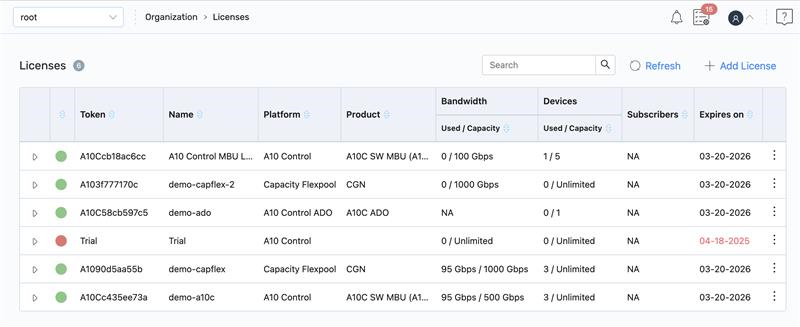
The License page at the Organization-admin scope assigns the entitlements available to Thunder devices within an organization. Organization-Admin users can view and allocate FlexPool licenses (Capacity and Instance) across devices in their organization.
To view and manage license at organization level, navigate to A10 Control home page > Organization-Admin scope > Organization > Licenses.
For more information on the supported license managers, see Manage Licenses .
On the Licenses page, you can perform the following:
- Search: Use Search to find a license by entering its token number.
- Refresh: Click Refresh to reload the panel to display the current license status.
- Add a License Key: Click + Add Licenses to add a license token.
- Expand License: Expand a license to view the following tabs:
- License Information: Displays license details such as token, platform, product, and validity.
- Associate Devices: Assigns the license to specific Thunder devices.
- License Activity Logs: Views the activity history of the license.
- Other Actions: Select the license and on the Associate Devices tab, click the Kebab menu
 to perform the following:
- Resync: After updating the license information in GLM or ALM, click Resync to sync the license details with the license manager.
Delete: Click Delete to remove a license. A license with associated devices cannot be deleted. First, disassociate the devices, which also removes the license from them. Once no devices are linked, the license can be deleted.
NOTE: After updating the device license and changing the license token, the new license is applied. - Export Devices: Click Export Devices to export devices details in the .csv format. This option is applicable for the Trail.