Manage Users and Permissions
The Users and Permissions module provides a centralized administration to manage all user identities, access groups, and permissions in one place. Organization administrators can quickly create or delete multiple users and adjust permissions without editing accounts individually.
This ensures RBAC enforcement, auditability, and scalability. After configuring authentication protocols (local or remote through User Auth), organization admins must come here to establish roles, access groups, and user accounts.
Relationship between Roles, Access Groups, and Users:
- Roles are predefined in A10 Control.
- Access Groups map one or more users (or external user auth groups) to a specific role and define its scope.
- Users inherit their effective permissions through membership in an access group.
The unified view allows organization administrators to manage users from a single interface.
Navigate to Users & Permissions
Navigate to Organization > Users & Permissions to view and manage users and permissions.
Figure 70 : Users & Permissions
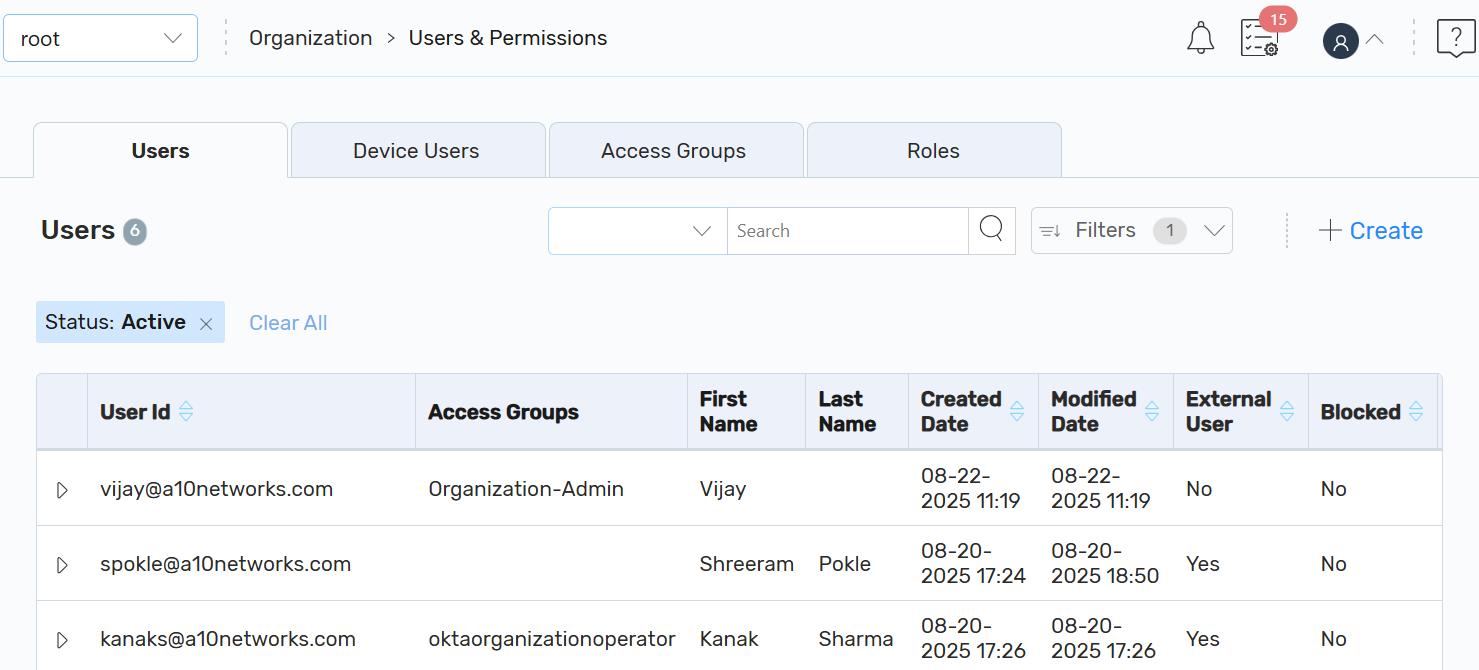
On the Users & Permissions page, you can manage the following:
- Users: The Users page is displayed by default to manage users.
- Device Users: Click Device Users to manage device users.
- Access Groups: Click Access Groups to manage access groups.
- Roles: Click Roles to view the A10 Control predefined roles.
- API Tokens: Click API Tokens to view Personal API Tokens (PATs).