Manage Users
The Users module allows the organization administrator manage users from a single interface. Users are individual accounts that log in and interact with A10 Control. Each user’s permission is based on their assigned roles and access groups.
After creating the access group and assigning the roles, you can start onboarding the users. From onboarding (creating accounts) to maintenance (resetting passwords) to deactivation, all actions are available here.
Navigate to Users Page
Navigate to Organization > Users & Permissions > Users to view and manage users associated with your organization in A10 Control.
Figure 84 : Users
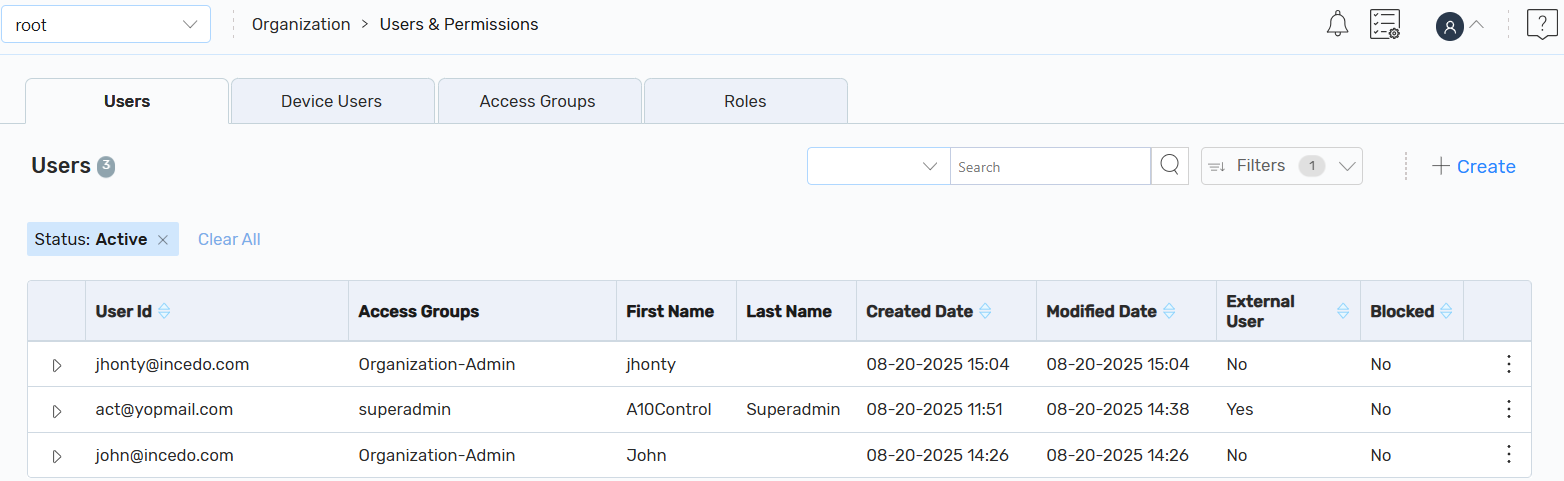
On the Users tab, you can also perform the following:
- Create: Click + Create to create a user.
-
Filters: Click the Filters or Filter by column icon and enter the search filters based on your requirements. The search results are displayed.
By default, the filter status is set to Active. If the Active filter is removed, it will list all the users.
-
Other Actions: Click the Kebab menu corresponding to the required user to perform the following:
- Edit: Click Edit to edit an existing user.
-
Block: Click Block to block a user temporarily.
The selected user is blocked and the Unblock icon is displayed. An option to send an email notification about the user being blocked also appears.
When an LDAP user is blocked, the LDAP user will not blocked. Hence, block the LDAP user in the LDAP server to prevent access to A10 Control.
The org-admin user cannot be blocked or deleted.
To send an email notification, click Submit Email. Else, click Do Not Submit Email.
NOTE: If you want to unblock a blocked user, click the Unblock icon. -
Delete: Click Delete to delete a user permanently.
On the Delete User dialog, click OK. The User Deleted Successfully message is displayed.
The Delete button is disabled for the external IDP user.
-
Reset Password: Click Reset Password to view the email notification content, download, and send a welcome message to the newly created user.
The Reset password button is disabled and not applicable for the external IDP User.
| NOTE: | If the user accounts are authenticated through an external or a remote authentication server, the External User column is set as Yes on the Users page. Else, it is set to No. |