Power
The Power menu allows a controller or super-admin to safely perform power operations, such as reboot or shut down nodes through the A10 Control GUI.
These power operations are useful during:
- Planned Maintenance: Apply patches or upgrades without affecting the whole cluster.
- Troubleshooting: Restart a problematic node to restore stability.
- Migration or Disaster Recovery: Coordinate a full shutdown or reboot during data center moves or disaster recovery drills.
- Data Protection: Ensure Ceph storage synchronization before taking nodes offline.
Depending on the scope of activities, a reboot or shutdown operation can be performed at both the node-level and cluster-level:
- Node-Level Power Operations: Allows rebooting or shutting down an individual node without impacting the entire cluster in case of 3-node cluster. For single-node, the cluster will be offline. This is useful when you want to isolate hardware or software faults, replace resources, or test failover.
- Cluster-Level Power Operations: Allows rebooting or shutting down all nodes in the cluster. This is useful during upgrades, planned downtime, or troubleshooting cluster-wide issues.
Prerequisites
Before proceeding with the power operations ensure that the A10 Control system is backed up to prevent data loss or configuration issues. For information, see Backup and Restore .
Access Power Page
Navigate to A10 Control > Power to manage power options.
Figure 57 : Single Node Power Options
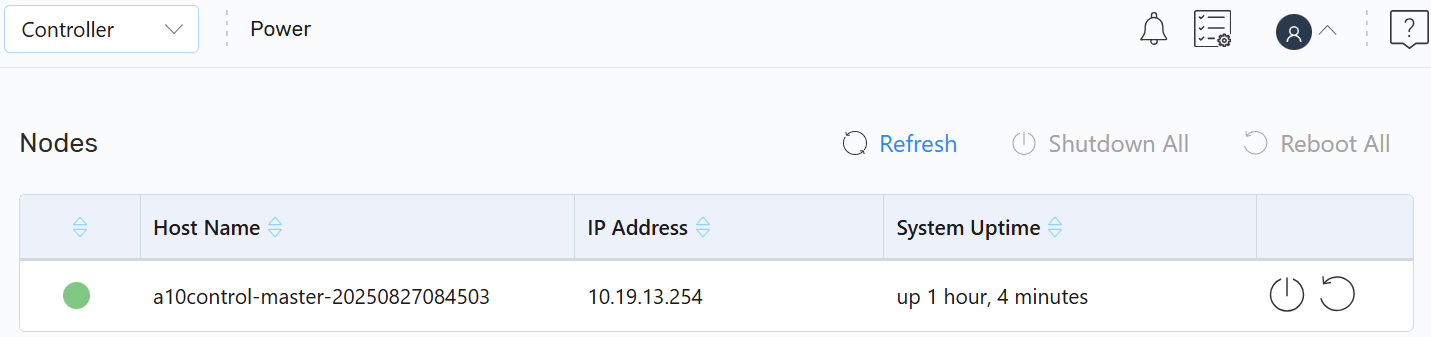
Figure 58 : Three Node Power Options

On the Power page, you can perform the following:
- Refresh: Click the Refresh icon to load all the available nodes.
-
Shutdown All: Click the Shutdown All icon to power off all nodes.
-
Reboot All: Click the Reboot All icon to reboot all devices.
- Other Actions: On an individual device you can perform the following:
| NOTE: | Some pods may temporarily show an Error state after a reboot. This is expected behaviour, the affected pods are cleaned up during the weekly scheduled automated cleanup process. |
The node status is displayed in a color-coded indicator:
- Green: Node is up and running.
- Yellow:The devices will be temporarily offline.
- Red: Node is offline.