Synchronize ACOS Configuration with A10 Control (Drift) 
| NOTE: | This is a preview feature intended for evaluation only. A10 Networks does not recommend for production deployments. |
The Drift tab in the Devices module shows configuration drift. It simply means that the actual configuration on a Thunder (ACOS) device is different from the configuration stored in A10 Control, meaning the two are out of sync or drift apart.
Drift typically happens when:
- A user makes configuration changes directly on the Thunder device (through CLI or aXAPI) instead of using A10 Control.
- A10 Control is not immediately updated with those changes.
As a result, the ACOS device and A10 Control drift apart, meaning the newly created configuration on the device will not be visible on A10 Control, and newly created ACOS objects such as VIPs, SLBs, or other configurations may remain undetected until a cluster configuration scan is triggered.
| NOTE: | A10 Control monitors each ACOS partition using a config-version object. If the version differs between the device and A10 Control, a configuration drift is shown in the Drift tab. For more information on how ACOS tracks configuration changes, see Introduced Configuration Synchronization Between A10 Control and ACOS. |
The following workflow explains how drift is detected and resolved in A10 Control:
- A user changes the configuration on the ACOS devices and notifies the A10 Control.
- In the Devices tab, a warning icon appears next to the affected Thunder device, indicating that its configuration no longer matches the configuration stored in A10 Control.
- On the Drift tab, the organization administrator can review the configuration differences in a side-by-side view.
-
After reviewing, the organization administrator admin can bring A10 Control back in sync with Thunder by clicking Sync.
You can sync a single partition, multiple partitions, or all partitions at once.
Figure 71 : Drift Warning
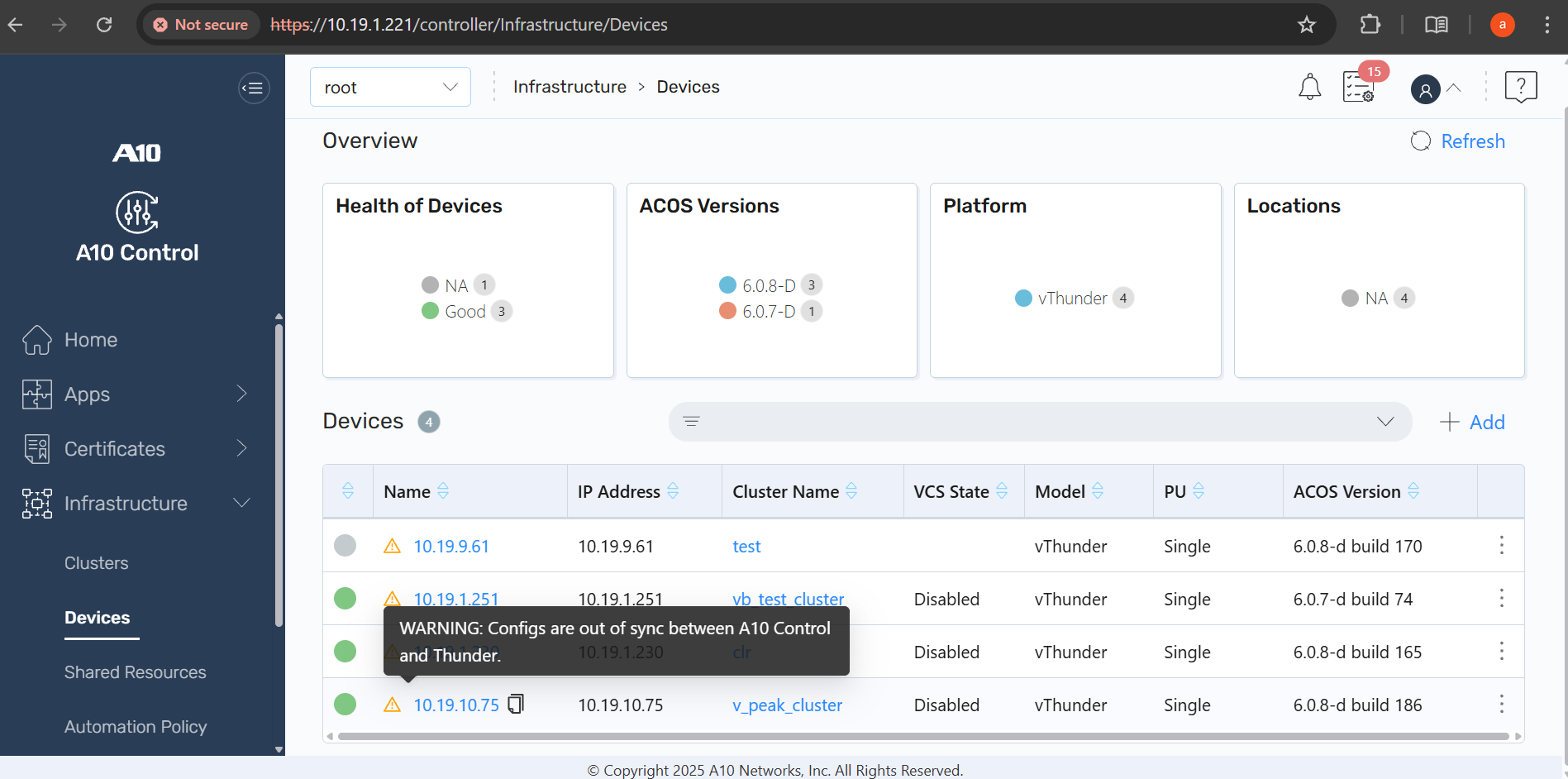
Navigate to Infrastructure > Devices > Device hyperlink > Drift tab.
Figure 72 : Drift details
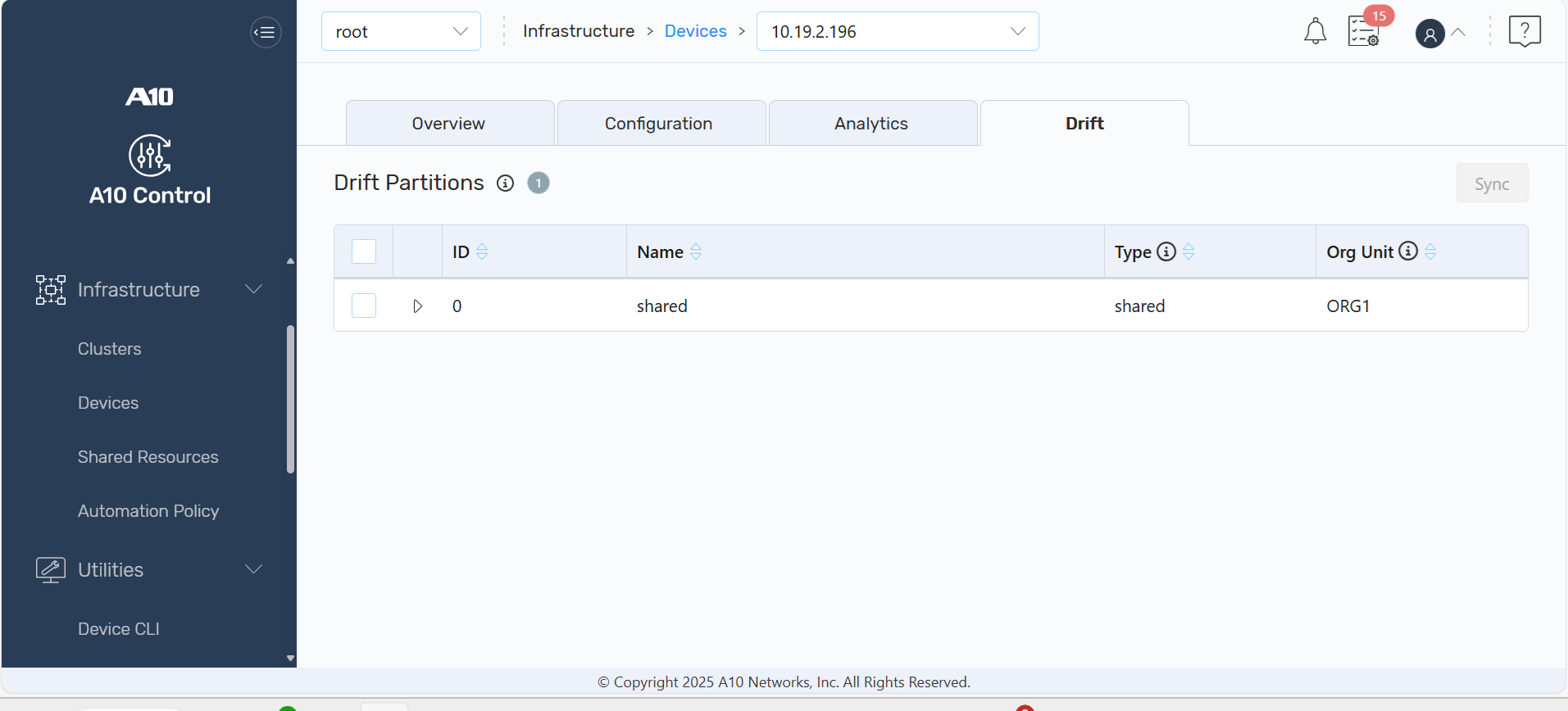
The following information is displayed:
| Field | Description |
|---|---|
| ID | A unique ID of the partition |
| Name |
The name of the partition |
| Type |
The type of the partition. The partition can be:
|
| Org Unit |
The org unit that the device partition is provisioned to |
View the Configuration Drift
- Under the Drift Partitions section, click the drop-down arrow next to a drift to view the partition-level details and the side-by-side difference between Thunder device and A10 Control.
- Click Refresh to check for any new drift notifications from the device and update the drift view before performing a sync.
Synchronize Configurations
Select one or more drifts by checking their corresponding checkboxes.
Click Sync (button is enabled only if at least one partition is selected). You can perform sync for:
- A single partition – synchronize the drift for one selected partition.
- Multiple selected partitions – synchronize drifts for multiple selected partitions.
- All drifted partitions – synchronize every partition that has detected drift.
After sync is completed successfully, the Drift tab is empty and the warning icon on the Devices tab disappears.
| NOTE: | Configuration changes pushed from A10 Control may incorrectly appear as drift on the device, even though the changes originated from A10C. Running Scan Config resolves the mismatch and clears the drift. |