System General Settings 
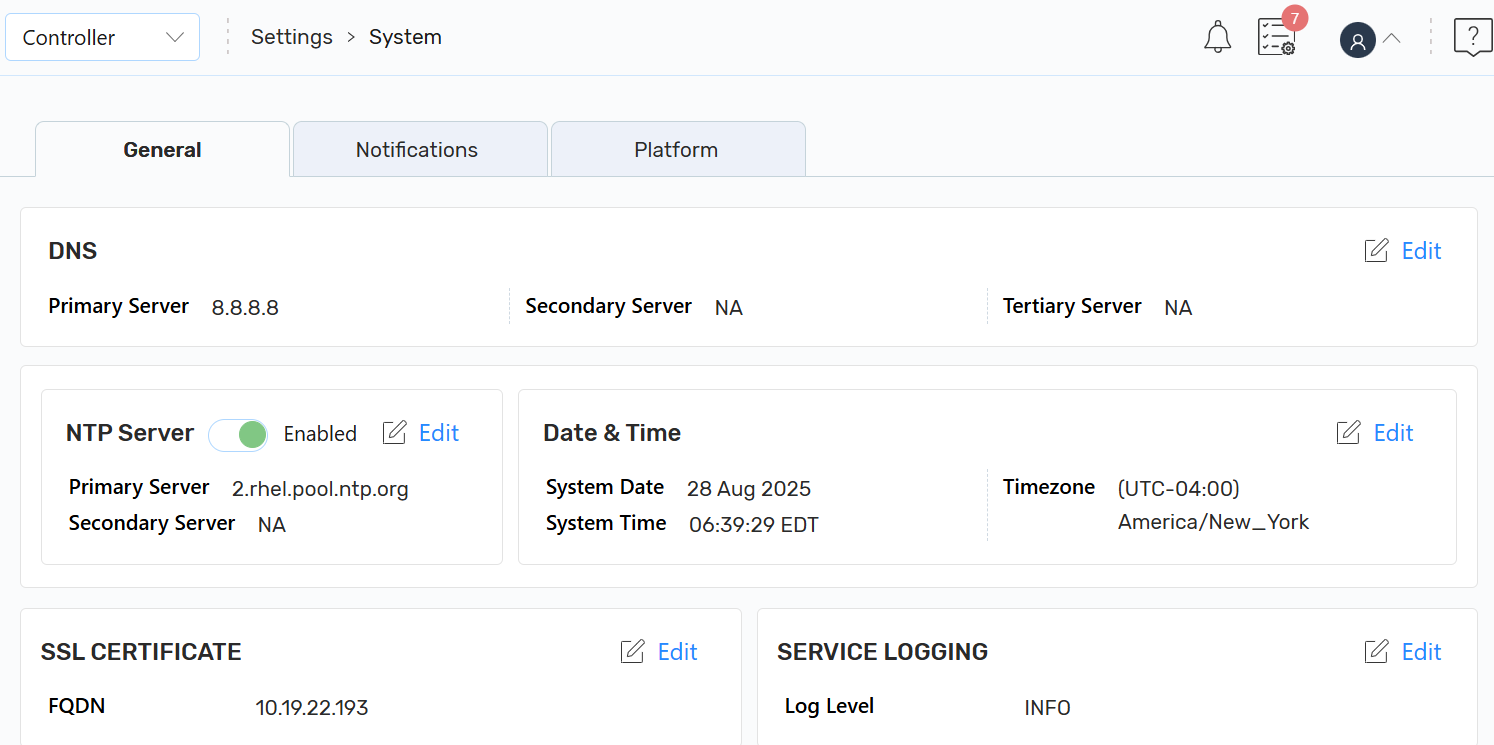
The General tab (Settings > System > General) in A10 Control provides system-wide configuration options. It allows the controller admin (super-admin) to manage key platform settings, including DNS, NTP, time settings, SSL, and service logging. Configuring these ensures consistent system operation and secure communications across the platform.
Navigate to the Settings > System > General tab.
Figure 41 : System General Settings
 DNS
DNS
The DNS server resolves domain names into IP addresses for external connectivity and services. Both IPv4 and IPv6 addresses are supported.
You can configure primary, secondary, and tertiary DNS servers to ensure high availability and fault tolerance.
| NOTE: | It is recommended to configure the DNS server during the initial deployment of A10 Control to enable external connectivity and avoid service interruptions. |
The controller or super-admin can configure primary, secondary, and tertiary servers for service availability, high availability, and fault tolerance.
Typically, you need to setup DNS server only once as part of the initial setup. However, you need to check or update the DNS server when moving between networks or datacenters or when the name resolution issues appear in logs.
To edit the DNS server details, click Edit and then click Save.
| Field | Description |
|---|---|
| Primary Server |
The main DNS server (supports IPv4 and IPv6). If you have not provided DNS while installing, the default IPv4 DNS server 172.31.31.31 or IPv6 DNS server is 2001:1:2:1::0 is applied and displayed. |
| Secondary Server |
Backup DNS server for redundancy (supports IPv4 and IPv6). Secondary DNS reduces the load on the Primary DNS. It acts as a backup DNS server if the primary server is not responding or unavailable. |
| Tertiary Server |
Additional backup server for fault tolerance (supports IPv4 and IPv6). It is an additional fallback DNS server if both primary and secondary are unavailable. |
NTP Server
The NTP settings synchronize the A10 Control system clock with external time servers. Accurate time configuration ensures:
- Correct timestamping of logs, events, and alerts.
- Consistency across multi-nodes for reliable operations.
The Controller Admin (super-admin) can configure primary and secondary NTP servers for redundancy and fault tolerance.
| NOTE: | NTP configuration is typically done during initial setup. Update settings only if time mismatches occur between nodes or when changing to a different network environment. |
The default NTP server is 2.rhel.pool.ntp.org.
On NTP server, you can use the Toggle button to enable or disable the NTP server.
- Enabled: Synchronization starts immediately and continues at regular intervals. The A10 Control clock stays aligned with the configured NTP servers, ensuring precise time and automatic adjustments.
To edit an NTP server, click Edit, edit primary and secondary servers, and then click Save.
| Field | Description |
|---|---|
|
Primary Server |
The main NTP server used to synchronize the system time. |
|
Secondary Server |
An alternate NTP server used for redundancy if the primary server is unavailable. |
Date & Time
Date & Time displays the current date, time, and timezone of the A10 Control system. These settings are used for event timestamps, logs, authentication tokens, scheduling, and reporting.
The controller or super-admin can only modify the timezone. You may need to edit the timezone especially when A10 Control is deployed in a new region or site to align reports and audit logs with local operations.
| Field | Description |
|---|---|
|
System Date |
Displays the current system date (non-editable). |
|
System Time |
Displays the current system time (non-editable). |
| Edit: click Edit to set a required time zone, and then click Save. | |
|
Time Zone |
Select the appropriate timezone. Setting the correct timezone ensures system time synchronizes with the local region so events, logs, and alerts are accurately recorded. |
SSL Certificate
The SSL Certificate section allows the Controller (Super-Admin) to configure the server certificate and private key required for secure access to the A10 Control application. This is necessary when the system is configured with a Fully Qualified Domain Name (FQDN).
Controller Admin must provide the FQDN and upload a CA-signed certificate and private key to enable encrypted access to the web interface.
On the SSL Certificate section, click the Kebab menu, and perform the following:
- Edit: Click Edit to update or replace the SSL certificate and then click Save.
- Reset as Default: Click Reset as Default to reset the default certificate settings.
|
Field |
Description |
|||
|---|---|---|---|---|
|
FQDN |
The Fully Qualified Domain Name (FQDN) used to access the A10 Control application securely over the network. The service name and zone name, in combination, forms FQDN.
|
|||
|
Server Certificate |
The CA-signed certificate configured on the server to authenticate the application and enable encrypted (SSL/TLS) communication with clients. |
|||
|
CA Certificate Chain |
The intermediate and root certificates configured to validate the server certificate and ensure clients trust the server. The certificate authority chain to validate the entities. |
|||
|
Private Key |
The private key configured along with the server certificate to establish secure communication between the server and clients. Specify up to 1-31 characters. |
|||
|
Validate Certificate |
Toggle to enable or disable SSL/TLS certificate validation for the FQDN. When enabled, A10 Control verifies that the certificate is valid and signed by a trusted CA.
|
SERVICE LOGGING
Service Logging manages the log levels. It allows a controller or super-admin to configure log levels for system services. You can choose from three levels:
- INFO: General system information and regular operations to monitor system.
- DEBUG: Detailed logs for investigating specific issues in-depth for troubleshooting.
- ERROR: Records of system errors and failures.
To edit logging configuration, click Edit, select the required log option, and then click Save to save the changes.
| Field | Description |
|---|---|
|
Log Level |
Select a log level INFO, DEBUG, or ERROR. |
See Also:
For more information about system and administrator settings, see the following guide on the Documentation site:
- "Common Setup Task" section in the System Configuration and Administration Guide