Network Control
The Network Control module enables a super-admin or controller to restrict inbound traffic to the A10 Control system by configuring Access Control List (ACL). ACLs act as a whitelist gatekeeper, and only the IPs you specify are allowed. This ensures that management and data interfaces access points are not left open to the entire network.
ACLs ensures consistent enforcement of access policies. Super-admins can define source IP addresses/CIDRs per A10 control services to whitelist the clients accessing the following A10 control services:
- HTTPS: This service is used to access A10 Control GUI and API. Whitelising HTTPS ensures only approved networks can access the management interface.
- SSH: This service is used to access the CLI of A10 Control nodes. Whitelisting SSH ensures only trusted admin hosts can connect to the shell nodes.
- sFlow: A10 devices can send telemetry data to A10 Control using sFlow. Whitelisting IP addresses for sFlow ensures A10 Control receives telemetry data from trusted devices. For more information about sFlow, see sFlow.
- Syslog Receiver: This service is used to integrate A10 Control with external third party systems using Syslog messages. Whitelisting syslog receiver ensures syslog messages are received from trusted systems.
The A10 Control system includes a predefined set of Access Control List (ACL) rules for both IPv4 and IPv6 addresses. By default, the SSH, HTTPS, and sFlow services are accessible from any IP address. You can create custom ACL rules to restrict or allow access based on your business needs.
Common Use Cases
- Securing GUI access: Limit HTTPS access to a defined set of corporate IP ranges.
- Regulatory compliance: Apply ACLs to enforce strict inbound policies required by standards such as PCI-DSS or ISO 27001, where only approved management IPs are allowed.
| NOTE: |
Consider the following when configuring SSH or HTTPS rules: |
Limitations
- ACLs cannot be applied to outbound traffic.
-
Editing the ACL is not supported.
Access ACL Page
Navigate to Settings > Network Control > ACL Config to manage ACL inbound rules.
Figure 52 : Access Control List
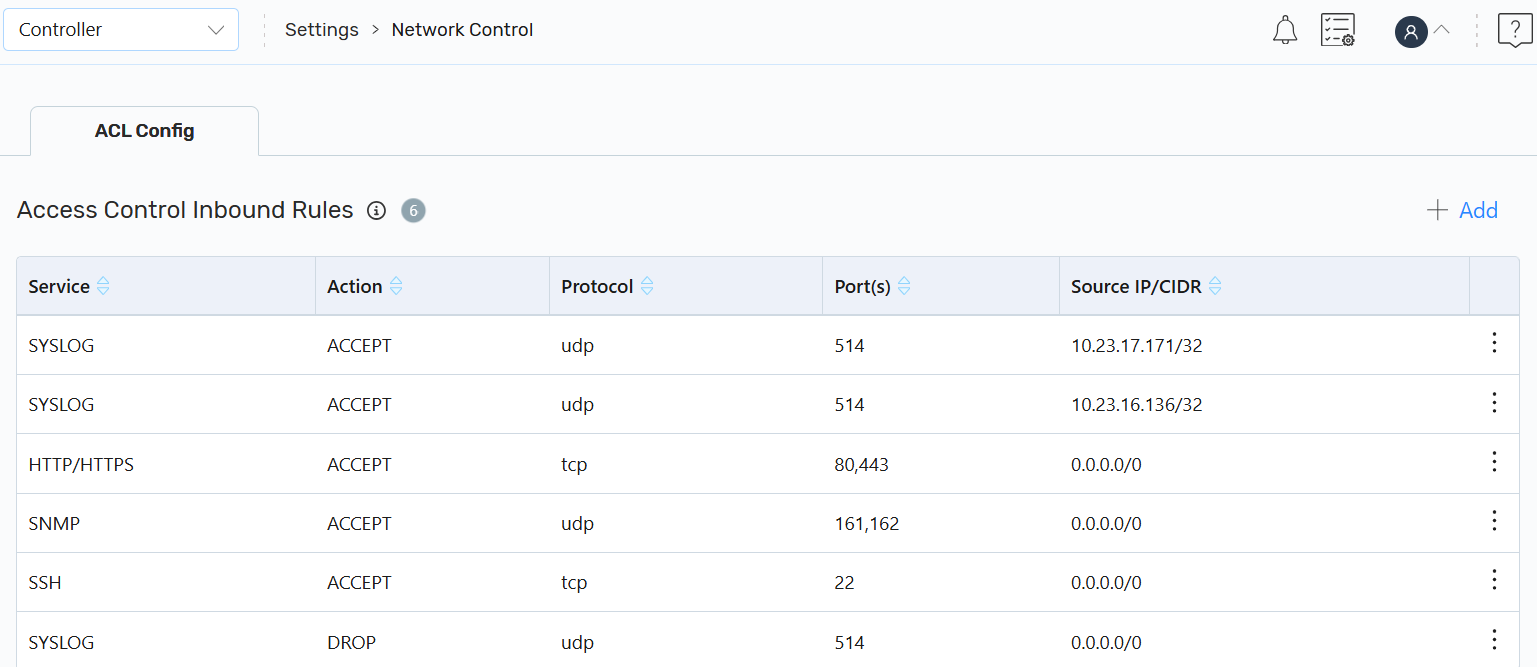
On the Access Control Inbound Rules page, you can also perform the following:
- Create: Click + Add to create an ACL inbound rule.
-
Other Actions: Click the Kebab menu corresponding to the required ACL to perform the following:
-
Delete: Click Delete to delete an ACL inbound rule.
On the Delete Access Control Inbound Rules dialog, click Yes. A confirmation message is displayed.
-