Manage Users
Users represent individual accounts that can log in and interact with A10 Control based on their assigned roles and access groups.
Organization Admins can view, add, modify, block, or deactivate users in the A10 Control.
To view and manage users associated with your organization in A10 Control, navigate to the A10 Control home page > Organization > Users > Users tab.
Figure 91 : Users
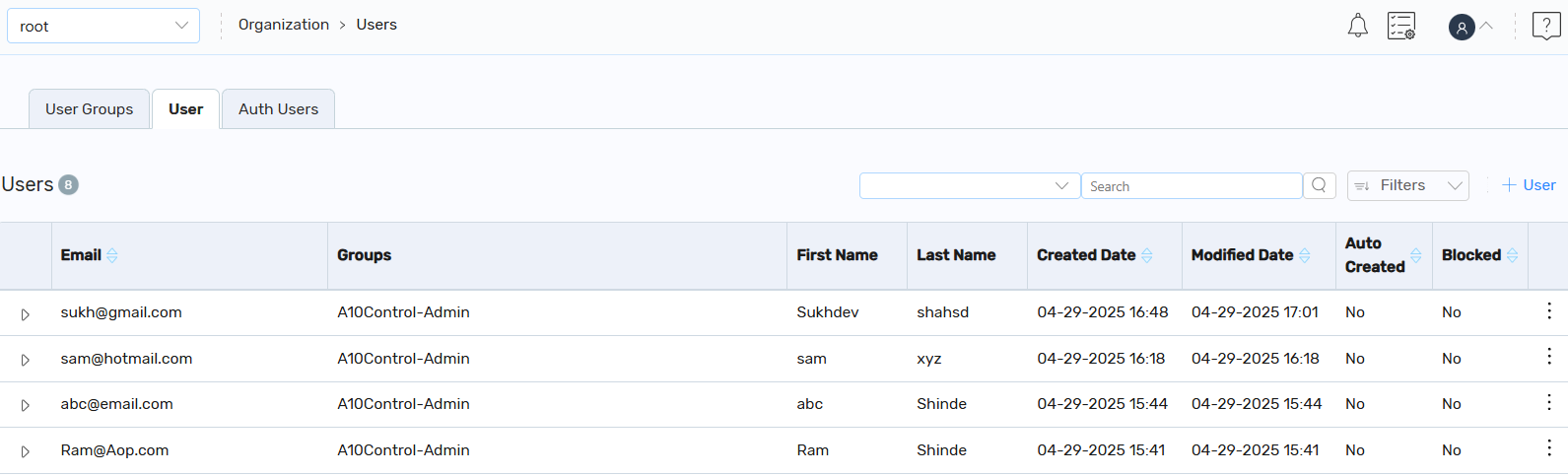
On the Users tab, you can also perform the following:
- Add a New User: Click + User to create a user.
-
Filter: Click the Filter or Filter by column icon and enter the search filters based on your requirements. The search results are displayed.
By default, the filter status is set to Active. If the Active filter is removed, it will list all the users.
-
Other Actions: Under the Kebab column, you can perform the following:
- Edit an Existing User: Click Edit to edit an existing user.
-
Block: Click Block to block a user temporarily.
The selected user is blocked and the Unblock icon is displayed. An option to send an email notification about the user being blocked also appears.
To send an email notification, click Submit Email. Else, click Do Not Submit Email.
NOTE: If you want to unblock a blocked user, click the Unblock icon. -
Inactivate: Click Inactivate to delete or inactivate an activate user.
The Inactive status indicates that the user has been softly deleted from the system and user account no longer exist in the system. However, administrators can view the list of deleted or inactivated users by applying the filter.
Administrators can deactivate users who have left their organization or org unit to prevent their access to the A10 Control application.
NOTE: If you want to re-activate a user, click the Activate icon. -
Notify: Click Notify to view the email notification content and send a welcome message to the newly created user.
The user should be already provisioned on your Identity Provider SSO system to be able to login. If the product access or login is conditioned on SSO IDP group membership, then the user should be already added to the corresponding group.