Integrate Venafi 
The Venafi integration is performed at the organization level. To manage certificates, administrators need to configure the Venafi host and provide the required credentials.
To integrate Venafi:
- Navigate to Certificates > Venafi Integration.
-
On the Venafi Integration, click + Create.
Figure 75 : Venafi Integration

-
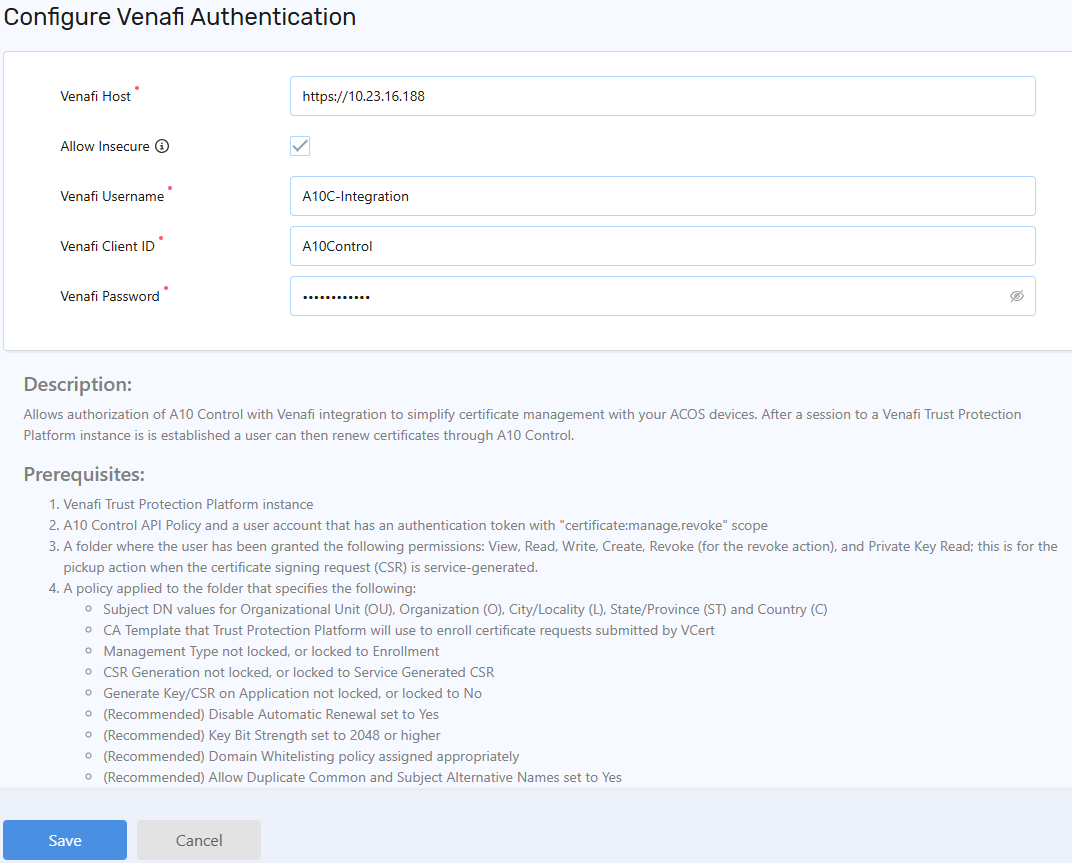
On the Venafi Configuration page, enter the following details:
Field
Description
Host
The IP address or URL of the Venafi Trust Protection Platform (TPP) to communicate with A10 Control.
Allow Secure
Select the checkbox to bypass the SSL validation by API calls for self-signed certificates.
If your Venafi server does not have a valid SSL certificate, enabling this option allows authentication to proceed without SSL verification.
Username
The username to manage Venafi.
Client ID
The Venafi client ID.
Password
The user’s password.
-
Click Save.
The confirmation message is displayed.
Edit Venafi Integration
To edit Venafi integration:
- Navigate to Certificates > Venafi Integration.
- On the Venafi Integration, click the Kebab menu.
-
On the Venafi Configuration page, update the details.
-
Click Save.
The confirmation message is displayed.