Activate External License Manager
The External License Manager feature allows multiple A10 Control instances to share a centralized licensing authority hosted on a designated A10 Control instance. This setup enables centralized management of license capacity, efficient distribution, and automatic reclamation.
Prerequisites
- For the Central Licenses Manager A10 Control instance:
- Local License Manager (LLM) must be activated.
- A valid FlexPool license must be imported from the Global License Manager (GLM).
- The instance must be reachable (using host and port) from all client A10 Control instances.
- Ensure the license is active and visible under Platform > License Management page. For more information, see Activate External License Manager.
-
For each Client A10 Control instance:
- LLM or GLM must not be enabled.
-
The instance must be able to establish network communication with the Central License Manager A10 Control instance.
Configure the Central License Manager A10 Control instance
To configure the Central License Manager A10 Control instance:
Activate External License Manager
Prerequisite
Designated A10 Control License Manager must be configured either as GLM or LLM mode.
To activate External License Manager on a A10 Control Instance (client) to point the designated Central License Manager A10 Control instance:
- From A10 Control home page, navigate to Platforms > License Management.
- On the License Manager page, click Edit.
-
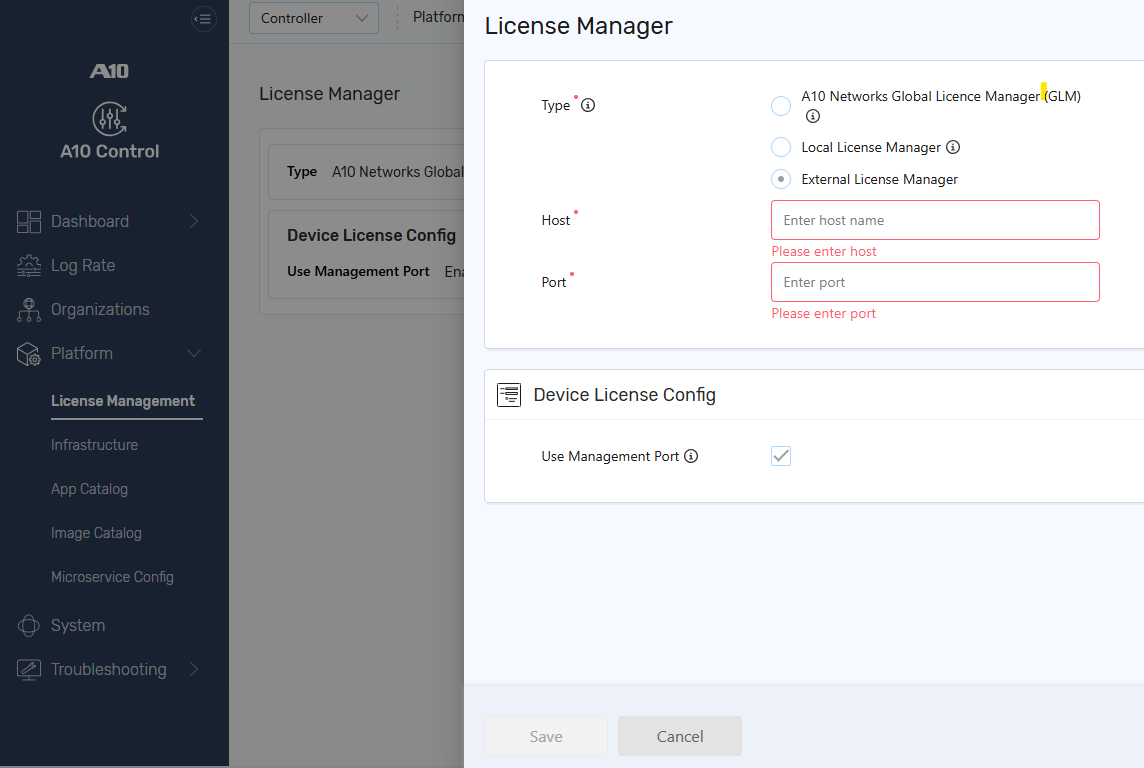
On the License Manager Setup page, select External License Manager to activate the LLM license.

- Enter the following details:
- Host: IPv4 or IPv6 address of the central license-managing A10 Control instance.
- Port: Communication port of the central license manager (default is typically 443 unless customized).
-
Select Use Management Port to allow connections through the management port.
-
Click Save.
Once configured, this instance acts as the Central License Manager. It enables multiple A10 Control instances(clients) to connect through the External License Manager mode. It centrally handles license distribution and automatically reclaims unused capacity when devices are removed or become inactive.
| NOTE: | When External License Manager is enabled, no license string is stored locally. The client instance fully depends on the Central Local License Manager for all license activations and capacity tracking. |
Monitor License Usage
Once connected to the Central License Manager, a client instance can:
- View shared license capacity managed by the Central License Manager.
- Automatically retrieve license capacity upon new device registration.
- Automatically return license capacity to the shared FlexPool if a device is deleted or its heartbeat is missed.
- View License Usage:
- Organization > Licenses
- Infrastructure > Devices or Clusters > View License Usage to visualize daily or monthly bandwidth trends.
-
Generate historical usage reports from Monitor > Reports > Generated Reports and export the data in CSV format.
View and Manage Imported License
On the License Manager Setup page, under the License section, you can perform the following:
-
Expand the license, to view the license details. The following are displayed:
-
License Information: The license information can be viewed.
- Activations: The license activation details such as Organization, Bandwidth, Activation On, and Last Synced On are displayed.
-
- Click the Kebab menu
 and perform the following: